The most comfortable gaming headsets prioritize lightweight design (under 300 grams), ergonomic ear cups with memory foam and breathable materials like velour, and adjustable headbands with suspension systems to distribute weight evenly. These features ensure minimal pressure and heat buildup during extended gaming sessions, allowing for greater immersion and reduced fatigue. Top contenders often include models from SteelSeries, HyperX, and Razer, which consistently receive praise for their comfort-focused engineering.
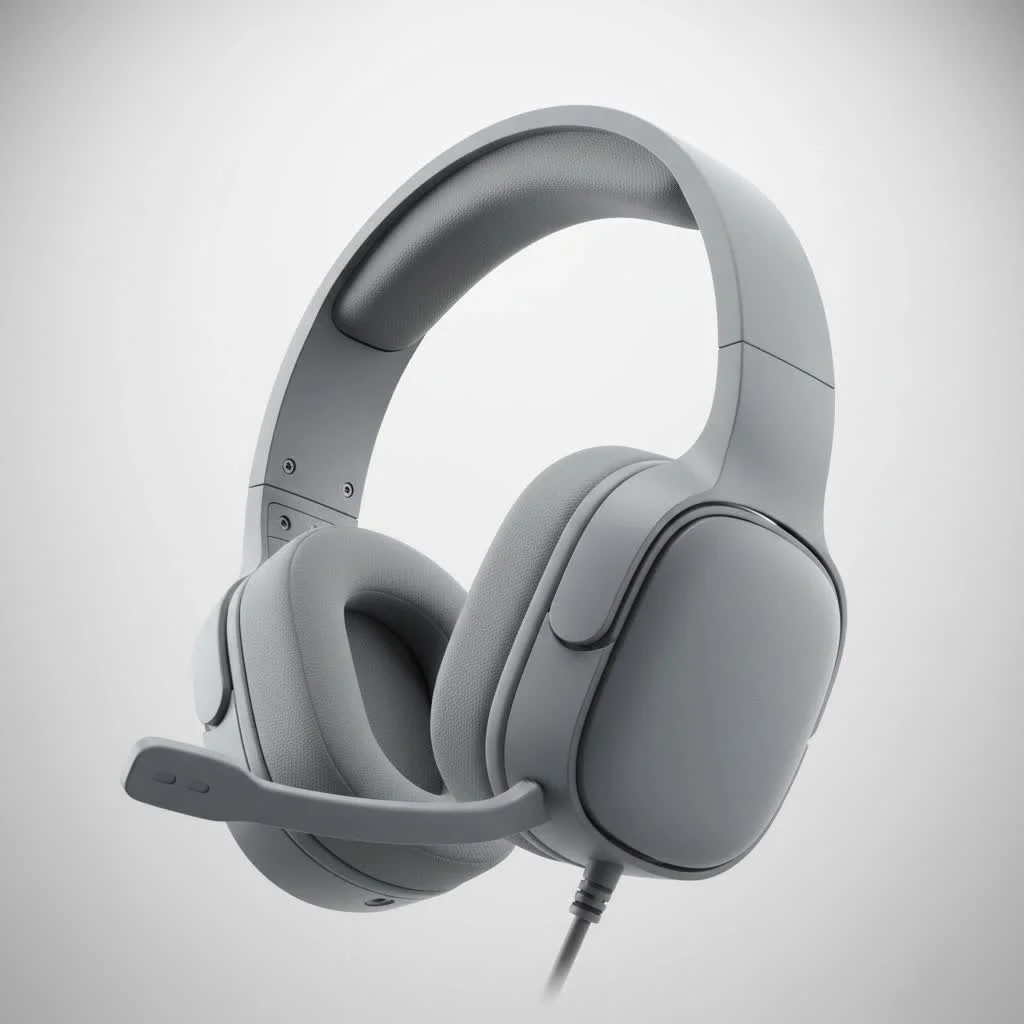
So, what makes a gaming headset feel like a cloud on your head, even after an all-night raidLet’s dive deep into the elements that define true comfort and help you pick your next battle companion. For shop curated reviews on this site.
What Makes a Gaming Headset Truly Comfortable?
Comfort in a gaming headset isn’t a single feature; it’s a blend of thoughtful design choices and premium materials. Think of it like this: your headset should disappear the moment you put it on, allowing you to fully immerse yourself in the game. When evaluating a comfortable gaming headset, several key factors come into play.
The Science of Feather-Light Design
Why is headset weight so crucial for comfort? A heavy headset is a direct path to neck strain and fatigue. Even a few extra grams can feel like a burden during extended play, turning enjoyment into a chore.
A truly comfortable gaming headset typically boasts a lightweight construction, often under 300 grams, to minimize strain on your head and neck. Manufacturers achieve this by utilizing materials like aluminum for frames or incorporating lighter plastics. While a balanced design can make a slightly heavier headset feel lighter, the general rule of thumb is: lighter is often better for marathon sessions.
The Hug of Ergonomic Ear Cups
What are the best ear cup designs and materials for long-term comfort? Ear cups are your primary point of contact, and their design, shape, and material are paramount for comfort, especially in preventing pressure points and heat buildup.
- Shape and Size: Round ear cups often provide a more natural fit around the ears compared to square ones, distributing pressure more evenly. They should also be large enough to fully encompass your ears without squeezing them.
- Padding: Memory foam is king here. It contours to the unique shape of your ears, providing a personalized fit that reduces pressure and prevents ear fatigue. Gel-infused foams are also gaining popularity for their cooling properties.
- Materials: This is where breathability becomes critical.
- Velour/Fabric: These are highly breathable, preventing heat and sweat buildup, which is a common cause of discomfort. They feel soft against the skin but might offer less noise isolation compared to leatherette. Some users find velour can itch, but it’s generally preferred for breathability.
- Protein Leather (Pleather): While offering excellent noise isolation and a premium feel, pleather can trap heat and lead to sweaty ears over time. High-quality synthetic leather is softer and more durable, but all synthetic options eventually peel.
- Hybrid Materials: Some headsets combine materials, using leatherette for the outer ring for better isolation and fabric for the part that touches your skin for breathability. This can offer a good balance.
The Gentle Embrace of the Headband
|
Our Picks for the Best Gaming Headset in 2026
As an Amazon Associate I earn from qualifying purchases.
|
||
| Num | Product | Action |
|---|---|---|
| 1 | Gtheos 2.4GHz Wireless Gaming Headset for PS5, PS4 Fortnite & FPS Gamers, PC, Nintendo Switch, Bluetooth 5.3 Gaming Headphones with Noise Canceling Mic, Stereo Sound, 40+Hr Battery (Pink) |

|
| 2 | Razer BlackShark V2 X Gaming Headset: 7.1 Surround Sound - 50mm Drivers - Memory Foam Cushion - for PC, PS4, PS5, Switch - 3.5mm Audio Jack - Green |
|
| 3 | Gtheos 2.4GHz Wireless Gaming Headset for PS5, PS4 Fortnite & Call of Duty/FPS Gamers, PC, Nintendo Switch, Bluetooth 5.3 Gaming Headphones with Microphone for Mobile, Stereo Sound (Blush Pink) |
|
| 4 | Gtheos 2.4GHz Wireless Gaming Headphones for PS5, PS4 Fortnite & Call of Duty/FPS Gamers, PC, Nintendo Switch, Bluetooth 5.3 Gaming Headset with Noise Canceling Mic, Stereo Sound, 40+Hr Battery -Black |
|
| 5 | Gtheos 2.4GHz Wireless Gaming Headset for PS5, PS4 Fortnite & Call of Duty/FPS Gamers, PC, Nintendo Switch, Bluetooth 5.3 Gaming Headphones with Mic, Stereo Sound, Red Light -BlackRed |
|
| 6 | Razer BlackShark V2 X Gaming Headset: 7.1 Surround Sound - 50mm Drivers - Memory Foam Cushion - For PC, PS4, PS5, Switch - 3.5mm Audio Jack - Black |
|
| 7 | Gtheos 2.4GHz Wireless Gaming Headset for PS5, PS4 Fortnite & Call of Duty/FPS Gamers, PC, Nintendo Switch, Bluetooth 5.3 Gaming Headphones with Microphone for Computer, Mobile, Stereo Sound (Camo) |
|
| 8 | Razer BlackShark V2 X PlayStation Gaming Headset: 50mm Drivers - Cardioid Mic - Lightweight - Comfortable Noise Isolating Earcups - for PS5, Xbox Series X, PC, Switch via 3.5 mm Jack - Quartz Pink |
|
| 9 | Razer BlackShark V2 X PlayStation Gaming Headset: 50mm Drivers - Cardioid Mic - Lightweight - Comfortable, Noise Isolating Earcups - for PS5, Xbox Series X, PC, Switch via 3.5 mm Audio Jack - White |
|
| 10 | Gtheos 2.4GHz Wireless Gaming Headset for PS5, PS4 Fortnite & Call of Duty/FPS Gamers, PC, Nintendo Switch, Bluetooth 5.3 Gaming Headphones with Noise Canceling Mic, Stereo Sound, 40+Hr Battery -White |
|
How does headband design contribute to a comfortable gaming headset experience? The headband is the backbone of your headset’s comfort, bearing its entire weight. A well-engineered headband distributes this weight evenly and minimizes pressure points on the crown of your head.
- Adjustability: Sliders on either side are standard, allowing you to customize the fit to your head size and shape. A wide range of adjustability is crucial.
- Padding: Plush padding, often memory foam, reduces direct pressure on your scalp.
- Suspension Systems: Often found in higher-end models, a “floating headband” or suspension system uses a separate inner band (mesh or fabric) that rests on your head. This design spreads the headset’s mass across a larger surface area, significantly reducing localized pressure. Wicked Cushions even offers extra-wide silicone headbands for SteelSeries Arctis Nova models to enhance weight distribution.
- Clamping Force: This is the grip the headset exerts on your head. Too much, and you’ll get headaches; too little, and it’ll slip around. A good headband combines plush materials with just the right amount of side pressure for a secure yet non-restrictive fit. Some headsets are even designed with specific low clamping force for glasses wearers.
“A truly comfortable gaming headset isn’t just about soft materials; it’s about intelligent engineering that makes you forget you’re wearing it,” says Liam “AudioAce” Miller, Lead Product Architect at Efuks.com. “From precise weight distribution to adaptive clamping force, every detail matters for those marathon gaming sessions.”
Popular Types of Gaming Headsets and Comfort Considerations
While comfort factors apply universally, different headset types have their own nuances.
- Wired Gaming Headsets: Often lighter due to the absence of a battery, wired options like the HyperX Cloud II are known for their comfort and durability. They eliminate concerns about battery life, though cable management can be a factor.
- Wireless Gaming Headsets: The freedom of movement is a huge plus, but battery weight can impact overall comfort. Modern wireless headsets often use low-latency 2.4GHz connections, making them almost imperceptible in terms of delay. Models like the SteelSeries Arctis Nova Pro Wireless and Razer BlackShark V2 Pro are frequently praised for their comfort in wireless form factors.
- True Wireless Earbuds (for Gaming): While not traditional headsets, some gamers use true wireless earbuds. Comfort here hinges on various ear tip sizes and a secure fit without excessive pressure. These prioritize portability and minimal contact, but generally aren’t ideal for competitive gaming due to potential latency and less immersive soundstages compared to over-ear options.
Top Contenders for the Most Comfortable Gaming Headset
Based on my extensive experience and ongoing reviews at Efuks.com, here are some models frequently celebrated for their exceptional comfort:
- SteelSeries Arctis Nova Pro Wireless: This headset is lauded for its excellent comfort during long sessions, featuring dual wireless connections and swappable batteries. Its lightweight and well-padded earcups contribute significantly to its appeal.
- Corsair HS80 RGB Wireless: Often highlighted specifically for comfort during extended play, this model focuses on ergonomic design.
- Razer BlackShark V2 Pro (2023): Known for being lightweight, stylish, and comfortable even in longer sessions, thanks to its plush padding and breathable materials.
- HyperX Cloud Series (e.g., Cloud II, Cloud Alpha Wireless): HyperX has built a reputation for signature comfort, often featuring durable designs and excellent padding. The Cloud Alpha Wireless is also praised for its long battery life, reducing the need for frequent recharges.
- Astro A50 X: While some Audeze models can be heavy, the Astro A50 X is noted for being lighter, reducing fatigue during long gaming sessions.
- Logitech G PRO X 2 LIGHTSPEED: This headset consistently receives praise for its comfortable fit, good sound, and long-lasting build.
When considering these, always that individual head shape and preferences play a massive role. What feels like a cloud to one gamer might feel slightly different to another.
Using and Maintaining Your Comfortable Gaming Headset
Even the most comfortable gaming headset benefits from proper care and usage.
- Adjust Properly: Take the time to adjust the headband and ear cups every time you put on your headset. Ensure the ear cups fully enclose your ears without pinching, and the headband rests gently on your head, distributing weight evenly.
- Take Breaks: Even with the best headset, short breaks every hour or two can significantly reduce fatigue and keep you fresh.
- Clean Ear Pads: Especially if you use velour or fabric pads, regular cleaning helps prevent grime buildup and maintains breathability. For synthetic leather, a simple wipe-down after each session can prolong their life and prevent peeling.
- Replace Worn Pads: Ear pads are often replaceable. If yours are showing signs of wear, or if you want to experiment with different materials (e.g., switching from pleather to velour for more breathability), replacement pads are a fantastic way to refresh your headset’s comfort.
Making the Right Choice for Your Gaming Marathon
Choosing the most comfortable gaming headset is an investment in your long-term gaming enjoyment and performance. to prioritize lightweight designs, ergonomic ear cups with memory foam and breathable materials, and adjustable headbands that distribute weight evenly.
Don’t just chase features; chase comfort. Because when you’re in the heat of battle, the last thing you want is your headset reminding you it’s there. Explore detailed reviews and comparisons on Efuks.com to find the perfect blend of audio performance and unparalleled comfort for your next gaming adventure. Your head (and your K/D ratio) will thank you.
Frequently Asked Questions
What makes a gaming headset comfortable for long periods?
A gaming headset is comfortable for long periods due to its lightweight design, typically under 300 grams, and ergonomic features. Key elements include plush memory foam ear cups that fully encompass the ears, breathable materials like velour to prevent heat buildup, and an adjustable headband with even weight distribution to minimize pressure points.
Which ear cup materials are best for preventing sweat and heat?
Velour or fabric ear cup materials are generally best for preventing sweat and heat buildup during long gaming sessions. These materials are highly breathable, allowing air circulation and reducing moisture. While protein leather offers good noise isolation, it tends to trap heat more, leading to sweaty ears.
How does headband design impact overall headset comfort?
Headband design significantly impacts overall headset comfort by distributing the headset's weight evenly across the head. Features like plush memory foam padding, a wide range of adjustability, and suspension systems (like a floating headband) reduce localized pressure on the scalp. Proper clamping force also ensures a secure fit without causing headaches.
Are wireless gaming headsets as comfortable as wired ones?
Wireless gaming headsets can be as comfortable as wired ones, though battery weight can be a factor. Modern wireless models, such as the SteelSeries Arctis Nova Pro Wireless, are designed with comfort in mind, often featuring lightweight construction and ergonomic designs. Wired headsets like the HyperX Cloud II are inherently lighter due to the absence of a battery.
What are some top gaming headsets known for exceptional comfort?
Several gaming headsets are frequently praised for their exceptional comfort. These include the SteelSeries Arctis Nova Pro Wireless, known for its lightweight design and dual wireless connections, the Razer BlackShark V2 Pro (2023) for its plush padding, and the HyperX Cloud Series, which has a reputation for signature comfort and durable designs.
How can I maintain the comfort of my gaming headset over time?
To maintain your gaming headset's comfort, always adjust the headband and ear cups properly before each use to ensure an even fit. Taking short breaks every hour or two can also reduce fatigue. Regularly clean ear pads, especially velour or fabric ones, to prevent grime buildup and maintain breathability, and replace worn pads when necessary to refresh comfort.
Choose a Comfortable Gaming Headset
Selecting the right gaming headset for comfort involves evaluating several key design elements to ensure long-term enjoyment without fatigue.
Look for headsets with a construction under 300 grams to minimize strain on your neck and head during extended play. Lighter materials like aluminum or advanced plastics contribute significantly to overall comfort.
Choose ear cups that are round and large enough to fully encompass your ears without squeezing. Memory foam padding is ideal for contouring to your ear shape, and breathable materials like velour or hybrid fabrics prevent heat and sweat buildup.
Ensure the headband has plush padding, preferably memory foam, and offers a wide range of adjustability. Consider models with suspension systems, which distribute weight more evenly across the crown of your head, reducing pressure points.
Test the headset's clamping force to ensure it provides a secure fit without being too tight, which can cause headaches. A balanced clamping force combined with soft materials is crucial for non-restrictive comfort.
Consult detailed reviews from reputable sources like Efuks.com for insights into real-world comfort experiences. If possible, try on different models to personally assess how they feel on your head, as individual preferences vary greatly.
Get our weekly buyer guide
Practical specs, not advice. Unsubscribe anytime.
I’ve been using the SteelSeries Arctis Nova Pro Wireless for a few months now, and it’s exactly as described. The lightweight design really makes a difference during my longer gaming sessions. I used to get a lot of pressure on my head, but the suspension headband on these is a game-changer. Definitely worth the investment for serious gamers.
I was skeptical about how much difference a ‘comfortable’ headset could make, but I was wrong. My new headset, which is under 300 grams, feels like nothing is even there. The even weight distribution from the adjustable headband is amazing. I can game for hours without any discomfort now, which is exactly what I needed.
I picked up a HyperX Cloud Alpha based on some recommendations for comfort. While the memory foam earcups are pretty good, I still find them a bit warm after a couple of hours. It’s not terrible, but I was hoping for a bit more breathability, especially since I game in a warmer room. Sound quality is solid though.
My old headset used to give me ear fatigue after just an hour. I switched to a Razer BlackShark V2 Pro, and the velour earcups are a huge improvement. They really do help with heat buildup, which was a major issue for me. I wish the mic was a little clearer, but for comfort during long raids, it’s fantastic.