Best Logitech Gaming Headset for Nintendo Switch
The Logitech G435 Lightspeed is the best Logitech gaming headset for Nintendo Switch, offering excellent wireless connectivity via both Lightspeed and Bluetooth, a lightweight design at 165 grams, and clear audio for both docked and handheld modes. Its versatile dual wireless options ensure seamless pairing with the console and other devices, prioritizing comfort and portability for extended gaming sessions on the go or at home.
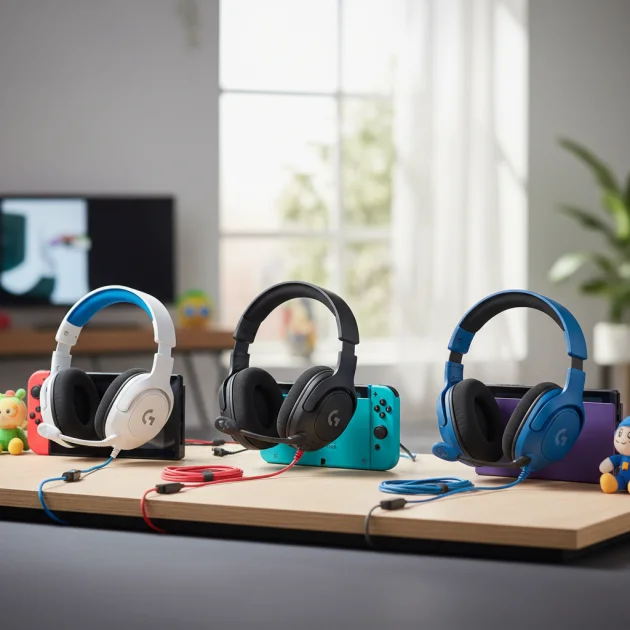
Quick Comparison
| Model | Connectivity | Weight | Battery Life | Key Feature |
|---|---|---|---|---|
| Logitech G435 Lightspeed | Lightspeed Wireless, Bluetooth | 165g | 18 hours | Ultra-lightweight, dual wireless |
| Logitech G733 Lightspeed | Lightspeed Wireless | 278g | 29 hours | Vibrant colors, DTS Headphone:X 2.0 |
| Logitech G Pro X Wireless | Lightspeed Wireless | 370g | 20 hours | Pro-grade sound, Blue VO!CE mic |
What Nintendo Switch Needs from a Gaming Headset
A gaming headset for Nintendo Switch requires specific features to enhance the experience. First, connectivity is crucial. The Switch supports Bluetooth for audio, but some games might introduce latency. A headset with a low-latency wireless dongle, often USB-A, is preferable for docked mode. For handheld play, Bluetooth is the primary wireless option. Wired connections via the 3.5mm jack are also reliable and latency-free. Second, comfort is paramount, especially for long gaming sessions. Lightweight designs and breathable earcups prevent fatigue. Third, clear audio is essential for immersive gameplay and communication in supported titles. The headset should deliver balanced sound, allowing players to hear both game audio and voice chat distinctly. Finally, a good microphone is necessary for online multiplayer, ensuring teammates can hear commands clearly. Portability and durability are also beneficial for gamers who frequently take their Switch on the go.
Detailed Reviews
Logitech G435 Lightspeed
The Logitech G435 Lightspeed stands out as an excellent choice for Nintendo Switch users due to its dual wireless capabilities. It connects via Lightspeed wireless using a USB-A dongle for docked play, offering low latency, or via Bluetooth for handheld mode. Weighing only 165 grams, it is incredibly light, ensuring comfort during extended gaming sessions. The breathable fabric earcups further enhance comfort. Its 40mm drivers deliver clear, balanced audio, suitable for various game genres. The integrated beamforming microphones reduce background noise, providing clear voice communication without a bulky boom mic. With up to 18 hours of battery life, it supports long gaming sessions. The G435 is also made with at least 22% recycled plastic, appealing to environmentally conscious buyers. Its compact design makes it highly portable, fitting easily into a Switch carrying case.
Logitech G733 Lightspeed
The Logitech G733 Lightspeed offers a more premium experience for Switch users primarily playing in docked mode. It connects via Lightspeed wireless using a USB-A dongle, providing a stable, low-latency connection. While it lacks Bluetooth, its robust wireless performance is ideal for competitive play. The headset weighs 278 grams, which is still relatively light for its feature set, and features comfortable, reversible suspension headbands and dual-layer memory foam earcups. Its 40mm PRO-G drivers deliver rich, full-spectrum sound, enhanced by DTS Headphone:X 2.0 surround sound for immersive audio. The detachable boom microphone with Blue VO!CE technology ensures crystal-clear voice communication, allowing for custom vocal filters. With up to 29 hours of battery life, the G733 supports marathon gaming sessions. Its vibrant color options also add a touch of personal style.
Logitech G Pro X Wireless
The Logitech G Pro X Wireless is designed for serious gamers seeking professional-grade audio and microphone performance. It connects to the Nintendo Switch via Lightspeed wireless using a USB-A dongle, making it best suited for docked play. At 370 grams, it is heavier than the other options but compensates with superior build quality and comfort, featuring premium leatherette and cloth ear pads. The 50mm PRO-G drivers provide incredibly precise and clear sound imaging, crucial for competitive gaming. Its standout feature is the detachable Blue VO!CE microphone, which offers real-time voice filters and noise reduction, ensuring studio-quality communication. The headset delivers up to 20 hours of battery life. While it lacks Bluetooth, its focus on audio fidelity and microphone clarity makes it an excellent choice for players who prioritize performance in a home setup.
Routine Fit
Choosing the right Logitech headset for your Nintendo Switch depends heavily on your gaming routine. If you primarily play in handheld mode or frequently travel, the Logitech G435 Lightspeed is the ideal fit due to its lightweight design and versatile Bluetooth connectivity. Its portability ensures you can easily take it anywhere. For those who mostly play in docked mode, either at home or at a friend’s house, the Logitech G733 Lightspeed or G Pro X Wireless offers superior audio and microphone performance via Lightspeed wireless. The G733 provides a balance of comfort and features with a stylish design, while the G Pro X Wireless caters to users demanding the highest audio fidelity and microphone clarity for a more stationary setup. Consider your primary use case to match the headset’s strengths with your gaming habits.
FAQs
Can I use any Logitech wireless headset with Nintendo Switch?
Not all Logitech wireless headsets are directly compatible with the Nintendo Switch. The Switch supports Bluetooth audio, so any Logitech headset with Bluetooth connectivity will work wirelessly in handheld mode. For docked mode, headsets that use a USB-A dongle for Lightspeed wireless can connect to the Switch’s USB ports. Headsets that rely solely on a proprietary wireless dongle without Bluetooth might not be compatible unless specifically stated. Always check the headset’s specifications for Nintendo Switch compatibility, especially regarding wireless connection types.
Does the Nintendo Switch support surround sound with Logitech headsets?
The Nintendo Switch itself outputs stereo audio. While some Logitech headsets, like the G733 Lightspeed and G Pro X Wireless, feature virtual surround sound technologies (e.g., DTS Headphone:X 2.0), these features typically rely on software processing on a PC. When connected to the Nintendo Switch, these headsets will reproduce the Switch’s stereo output with high fidelity. You will experience excellent stereo separation and imaging, but the advanced virtual surround sound features will not be active as they would be on a compatible PC setup.
How do I connect a Logitech Lightspeed headset to my Nintendo Switch?
To connect a Logitech Lightspeed headset to your Nintendo Switch, you will need to use the included USB-A Lightspeed dongle. If your Switch is docked, simply plug the USB-A dongle into one of the USB ports on the dock. The Switch will automatically recognize the headset as an audio output device. For handheld mode, you would need a USB-C to USB-A adapter to connect the dongle to the Switch’s USB-C port. Ensure the headset is powered on and paired with its dongle. Bluetooth-enabled Logitech headsets connect directly via the Switch’s Bluetooth settings.
Are Logitech gaming headsets comfortable for long Switch sessions?
Yes, many Logitech gaming headsets are designed with comfort in mind, making them suitable for extended Nintendo Switch gaming sessions. Models like the Logitech G435 Lightspeed are exceptionally lightweight (165g) with breathable fabric earcups, minimizing pressure and heat buildup. The Logitech G733 Lightspeed features a suspension headband and dual-layer memory foam for balanced comfort. Even the G Pro X Wireless, while heavier, uses premium materials for its ear pads to ensure a comfortable fit. Comfort levels can vary by individual, but Logitech generally prioritizes ergonomic designs.
Can I use the microphone on a Logitech headset for voice chat on Nintendo Switch?
Yes, you can use the microphone on a compatible Logitech headset for voice chat on the Nintendo Switch, provided the game supports in-game voice chat or you are using the Nintendo Switch Online smartphone app. For headsets connected via Bluetooth or a USB-A dongle, the microphone should function automatically. Games like Fortnite and Apex Legends have integrated voice chat. For other games, the Nintendo Switch Online app facilitates voice communication, and your headset’s microphone will work through your smartphone. Always ensure your headset’s microphone is not muted.
Verdict
For Nintendo Switch users seeking the best Logitech gaming headset, the Logitech G435 Lightspeed offers the most versatile and user-friendly experience. Its dual Lightspeed and Bluetooth connectivity caters to both docked and handheld play, while its ultra-lightweight design ensures maximum comfort during long sessions. While the G733 Lightspeed and G Pro X Wireless provide superior audio fidelity and microphone performance for a more stationary, docked setup, the G435’s balance of features, portability, and ease of use makes it the top recommendation for the diverse needs of a Nintendo Switch gamer.
Frequently Asked Questions
Which Logitech wireless headsets are compatible with Nintendo Switch?
Logitech headsets with Bluetooth connectivity work wirelessly in handheld mode, such as the G435 Lightspeed. For docked mode, headsets using a USB-A Lightspeed dongle, like the G435, G733, and G Pro X Wireless, can connect to the Switch's USB ports. Always verify specific model compatibility.
Does the Nintendo Switch support virtual surround sound with Logitech headsets?
The Nintendo Switch outputs stereo audio, so while Logitech headsets like the G733 Lightspeed and G Pro X Wireless feature virtual surround sound technologies (e.g., DTS Headphone:X 2.0), these advanced features typically rely on PC software. When connected to the Switch, these headsets will provide high-fidelity stereo sound, but the virtual surround sound will not be active.
How do I connect a Logitech Lightspeed headset to my Nintendo Switch?
To connect a Logitech Lightspeed headset, plug its USB-A Lightspeed dongle into a USB port on the Switch dock for docked play. For handheld mode, a USB-C to USB-A adapter is needed to connect the dongle to the Switch's USB-C port. Bluetooth-enabled Logitech headsets connect directly via the Switch's Bluetooth settings.
Are Logitech gaming headsets comfortable for extended Nintendo Switch sessions?
Yes, many Logitech gaming headsets are designed for comfort during long sessions. The Logitech G435 Lightspeed, weighing 165g, features breathable fabric earcups. The Logitech G733 Lightspeed includes a suspension headband and dual-layer memory foam, while the G Pro X Wireless uses premium ear pad materials for a comfortable fit.
Can I use a Logitech headset microphone for voice chat on Nintendo Switch?
Yes, you can use the microphone on a compatible Logitech headset for voice chat on the Nintendo Switch. This works for games with integrated voice chat like Fortnite, or through the Nintendo Switch Online smartphone app. Ensure your headset's microphone is not muted for clear communication.
Get our weekly buyer guide
Practical specs, not advice. Unsubscribe anytime.
I picked up the Logitech G435 Lightspeed after reading about its dual wireless options, and it’s been a game-changer for my Switch. The Bluetooth connection is super stable, and I love how lightweight it is at just 165 grams. I can wear it for hours during long gaming sessions without any discomfort, whether I’m docked or playing handheld.
I went with the Logitech G Pro X Wireless for the pro-grade sound and the Blue VO!CE mic, and it really delivers. My friends say my voice comes through crystal clear during online matches. The battery life of 20 hours is also fantastic, meaning I rarely have to worry about charging mid-game.
The Logitech G733 Lightspeed is pretty good, especially with the DTS Headphone:X 2.0 for immersive sound. My only real complaint is the weight; at 278g, it feels a bit heavy after a couple of hours compared to some other headsets I’ve tried. The vibrant colors are a nice touch though.
Seriously impressed with the Logitech G435. The 18-hour battery life is more than enough for my needs, and the Lightspeed wireless is flawless. It’s so convenient to switch between my Switch and my phone without any hassle. Definitely recommend it for anyone who games on the go.